Deep Dive
Free GPUs in the cloud: images, edited photos and AI video
A photo more than a hundred years old that turns to color with one sentence, a neon sign that appears from a request and a protein spinning in 3D. None of it ran on my computer.
Watch it on
01What it's about
A photo of Haedo station, black and white and more than a century old, that turns to color and night, with the street lamps lit, from a single sentence. A neon sign that appears from a request. An old photo that moves, with sound. And a protein spinning in 3D.
All of that ran on a borrowed graphics card, for free, from the browser. That's what this Deep Dive is about: what a borrowed card is, how Colab, Kaggle and Hugging Face work inside, what you can create with one, how long each thing really takes and which one to pick.
Limits and plans change: check each site before you decide.

Chapters
- 0:00 · Free, from the browser
- 0:44 · What a borrowed graphics card is
- 1:35 · Colab, Kaggle and Hugging Face inside
- 2:48 · Creating images from a sentence
- 4:23 · Editing a photo with a sentence
- 5:55 · What ComfyUI is
- 6:21 · A serious use and more models
- 7:02 · Colab versus Kaggle
- 7:31 · The other places
- 7:51 · The final rule
- 8:10 · Takeaways
02What a borrowed graphics card is
A graphics card, also called a GPU, does a huge number of calculations at the same time. And artificial intelligence is exactly that: calculations and more calculations.
Think of it like this: the processor is one fast person with a calculator. The graphics card is a whole classroom of people, each with a calculator. For this kind of work, the classroom wins.
A good graphics card is expensive. Mine is old and has 2 GB of memory, and the first model I tried used more than 14. So I borrow one: some sites lend you a computer with a graphics card, right from the browser.
- Model
- A program that looked at millions of examples until it learned to do something.
- Notebook
- The way you use that borrowed computer: the code goes in blocks and you run them one at a time.
- Prompt
- The request you write to the model. I write mine in English.
03Colab, Kaggle and Hugging Face inside
- Colab is from Google. It's a notebook that opens in the browser, with nothing to install, and it's saved in your Google Drive. It's free and lends you a graphics card.
- Kaggle is also from Google (it joined in 2017). It's a community of people who work with data and artificial intelligence, with competitions, models and notebooks like the ones in Colab. It's free and lends you two T4 cards at the same time.
- Hugging Face is something else: it's the place where open models are published. Its front page talks about more than 2 million. It also has Spaces: pages where someone left a model running so you can try it.
On Kaggle you open a new notebook, pick the accelerator in the settings and press run. To turn that on, it asked me to verify my phone.
One rule: what's there is borrowed. If the session ends, it gets erased. Download whatever you want to keep before you close it.
04Creating images from a sentence
The first test was with Z-Image-Turbo, on Kaggle with a T4. I asked for a neon sign that says "Se hace", on a rainy street. The sign came out spelled correctly.

The second model was MiniMax H3 Image. The original is huge and doesn't fit on the free card, so I used a compressed version. I didn't make that version: the community published it on Hugging Face and I downloaded it from there.
- Compressed, on Kaggle with a T4: between 110 and 126 s per image.
- The text came out right in 4 of the 6 images. In the other two, one word came out blurry and another came out deformed.
- Uncompressed, on its Hugging Face page: one 4096 × 4096 image in 33 s.
05Editing a photo with a sentence
This was the test I liked the most. The model doesn't start from zero: you give it your photo and write the change you want.
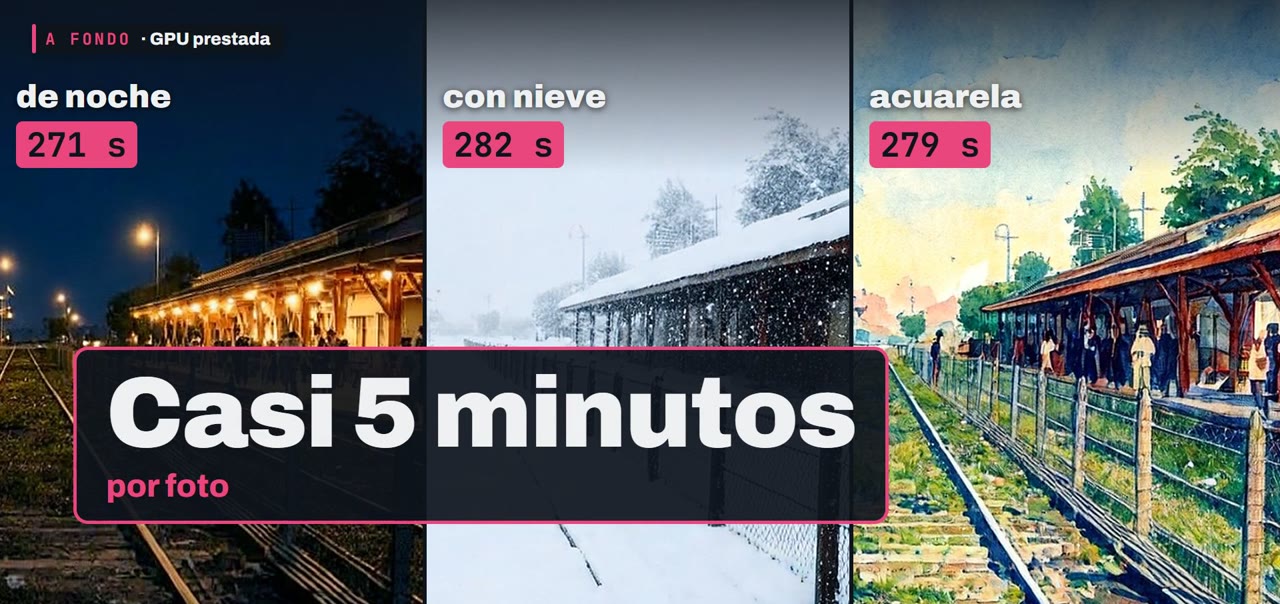
The photo is of Haedo station, around 1915, in black and white and in the public domain (Wikimedia Commons). With compressed MiniMax H3 Image, on Kaggle with a T4, I asked for three things: color and night, with snow, and in watercolor.
I also tried an older model, InstructPix2Pix, with the same photo and the same requests. It took between 8 and 14 s per edit. But the night came out with no color and not a single street lamp, the snow never showed up and the watercolor was a whole rainbow.
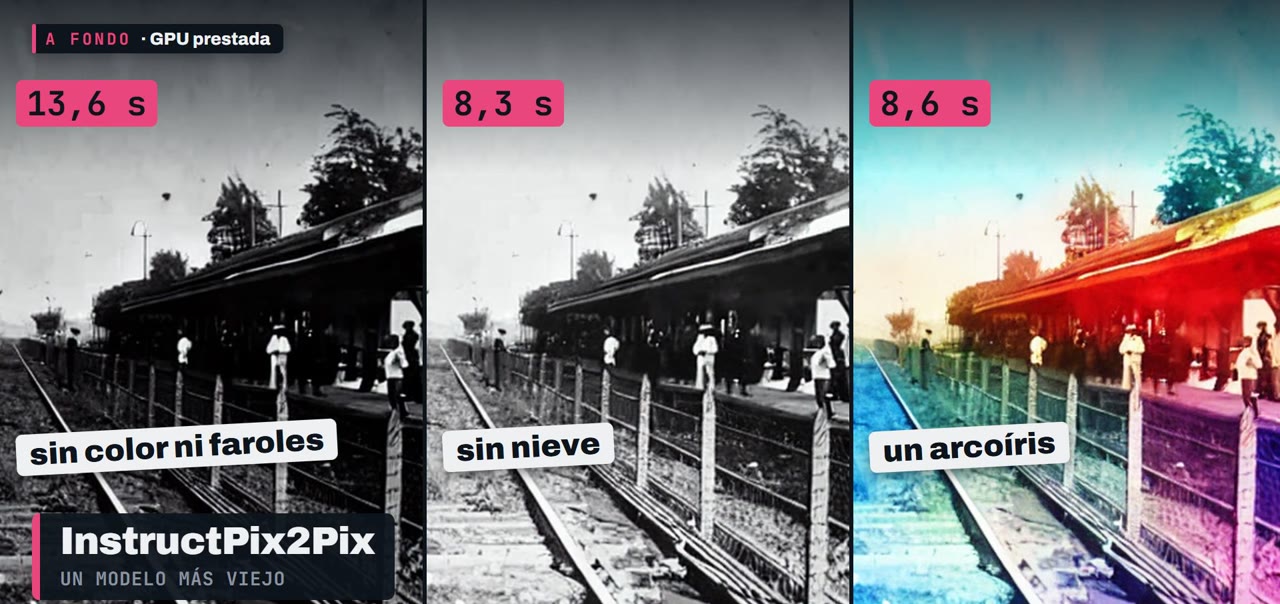
Fast isn't always useful: the time you save, sometimes you pay for in quality.
Making the photo move
With MiniMax H3 for video (image to video, with sound) I made two 5-second clips, also on Kaggle with a T4. The station one starts from the photo already turned to color.
For video, the free card is just enough. But it is enough.
06What ComfyUI is
If you look for an image or video model, you'll see that name a lot. It's a free program for using models without writing code: on the screen you build little boxes joined by cables. One loads the model, another receives the request and another hands you the image.
ComfyUI wasn't used in this video: everything ran with code, on Kaggle. And on Colab's free tier, according to its FAQ, using an interface like that isn't allowed. That's left for another video.
07A serious use and more models
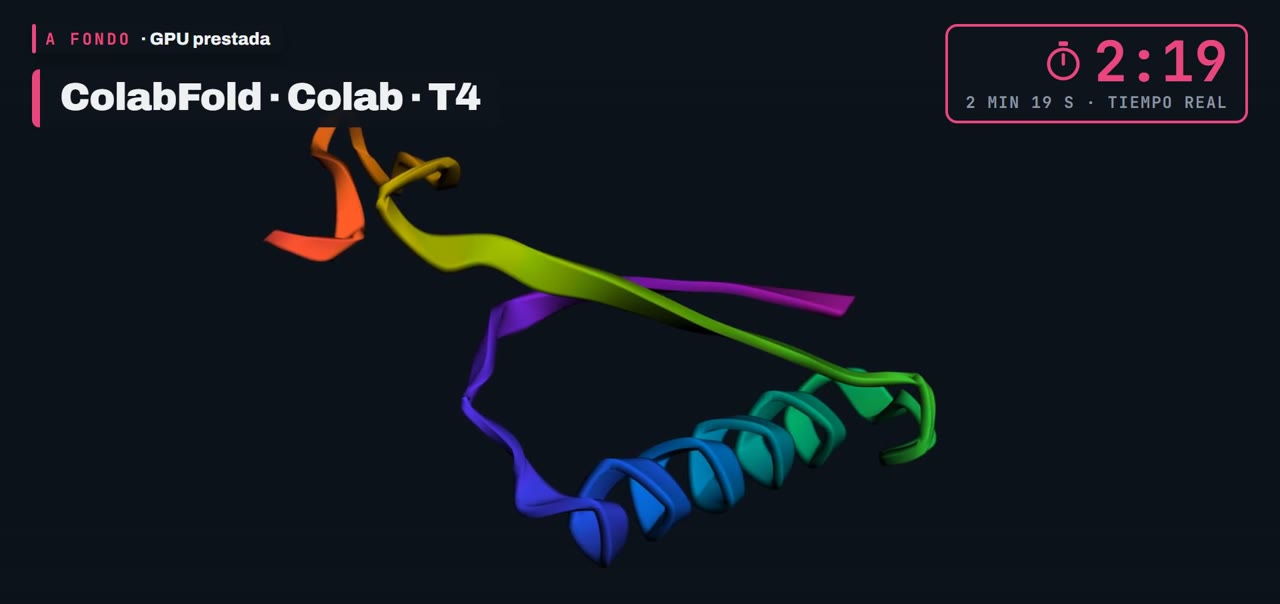
This isn't only for making a pretty image. ColabFold runs AlphaFold2 on Colab: you give it a protein, which is a row of letters, and it gives you back its shape.
Other models also fit on a card like that: Whisper, which turns audio into text; Stable Diffusion, the classic for creating images; and small language models, like Llama or Gemma. I leave their pages in the sources.
08Which one to pick
- Colab: you open a link and that's it. It's the easiest. But it can cut off without warning and Google doesn't publish where the limit is.
- Kaggle: two cards at the same time, you see your weekly quota in your account and it runs on its own, without the tab open. To turn it on you have to verify your phone.
Side by side: Colab is easier to start with and Kaggle is steadier for working.
The other places
- Nvidia has a page with models already running, to try out. It's not a machine of your own.
- Lightning AI gives you credit to start and a whole computer in the cloud. The credit runs out.
- SageMaker Studio Lab, from Amazon, no longer lets new people in.
- Saturn Cloud and Deepnote: the free plan doesn't come with a graphics card.
The final rule
- Colab, for a one-off test.
- Kaggle, for weekly work.
- Hugging Face, to look before you run.
And one warning: before you download a model, check how much memory it asks for. If it doesn't fit on the card, it won't start. See if someone has already uploaded a compressed version.
09Takeaways
A borrowed graphics card lets you create an image, edit a photo and even fold a protein without buying anything. It has quotas and it keeps changing: measure before you pay.
I measured the times for images, edits, video and protein myself on the free T4 card, on November 14 and 15, 2026.
This content uses an AI-cloned voice: it's my own voice, cloned with OmniVoice. The example images and videos are generated with AI.
The next Deep Dive is GitHub: what it is and how it saves you when you break something. Tell me in the video comments what you'd try first.
10Sources
The official pages where I read each fact, with the date I saw them.
- Colab: FAQ (unpublished limits; web interfaces not allowed on the free tier)research.google.com/colaboratory/faq.html
- Colab: welcome notebook (opens without signing in)colab.research.google.com/notebooks/intro.ipynb
- Kaggle: notebooks documentation (two T4s, 12 hours per session)kaggle.com/docs/notebooks
- Kaggle: weekly graphics card quota (30 hours or more, depending on demand)kaggle.com/docs/efficient-gpu-usage
- Google Cloud: Kaggle joined Google in 2017cloud.google.com/blog/products/gcp/welcome-kaggle-to-google-cloud
- Hugging Face: front page (more than 2 million models)huggingface.co
- Hugging Face: what Spaces arehuggingface.co/docs/hub/spaces-overview
- Hugging Face ZeroGPU (5 minutes of graphics card per day with a free account)huggingface.co/docs/hub/spaces-zerogpu
- Z-Image-Turbo: model pagehuggingface.co/Tongyi-MAI/Z-Image-Turbo
- MiniMax H3 Image: original modelhuggingface.co/MiniMaxAI/MiniMax-H3-Image
- MiniMax H3 Image: compressed version (GGUF) published by the communityhuggingface.co/unsloth/MiniMax-H3-Image-GGUF
- stable-diffusion.cpp: the engine that runs the compressed versiongithub.com/leejet/stable-diffusion.cpp
- InstructPix2Pix: model pagehuggingface.co/timbrooks/instruct-pix2pix
- MiniMax H3: video modelhuggingface.co/MiniMaxAI/MiniMax-H3
- ColabFold (AlphaFold2 on Colab)github.com/sokrypton/ColabFold
- Photo of Haedo station, around 1915, public domain (Wikimedia Commons)commons.wikimedia.org/wiki/File:Estacion_haedo_antigua_1910s_02.jpg
- Nvidia: hosted models to trybuild.nvidia.com
- Lightning AI: planslightning.ai/pricing
- SageMaker Studio Lab: closed to new peopledocs.aws.amazon.com/sagemaker/latest/dg/studio-lab-availability-change.html
- Saturn Cloud: planssaturncloud.io/pricing
- Deepnote: plansdeepnote.com/pricing
- Whisper (audio to text)github.com/openai/whisper
- Stable Diffusion: example notebookgithub.com/huggingface/notebooks/blob/main/diffusers/stable_diffusion.ipynb
- Gemma: official guideai.google.dev/gemma/docs/core/huggingface_text_finetune_qlora
- Llama: example notebooksgithub.com/unslothai/notebooks
- Music in the video: MELODIES WITH A BEAT, by Loyalty Freak Music (2018), public domain (CC0 1.0)freemusicarchive.org/music/Loyalty_Freak_Music/MELODIES_WITH_A_BEAT
Keep reading



Newsletter
What I'm trying, explained simply, straight to your inbox. In Spanish for now. No spam, and you can unsubscribe anytime.